DreamBot
Pitchfork support for DreamBot
DreamBot
DreamBot is the most thoroughly integrated client in Pitchfork. We ship a custom Java wrapper that exposes account credentials, script selection, breaks, world hopping, mouse speed, proxy injection, and the full set of DreamBot CLI flags through the Pitchfork UI.
Support Status
Fully supported. Both DreamBot 3 (dreambot) and DreamBot 4 (dreambot4) client types are recognized.
How to use
- Install DreamBot from dreambot.org on the machine that will run your agent. The Pitchfork wrapper finds the JAR by convention — no path field to fill in.
- Make sure your DreamBot account is set up and verified (login at least once on that machine).
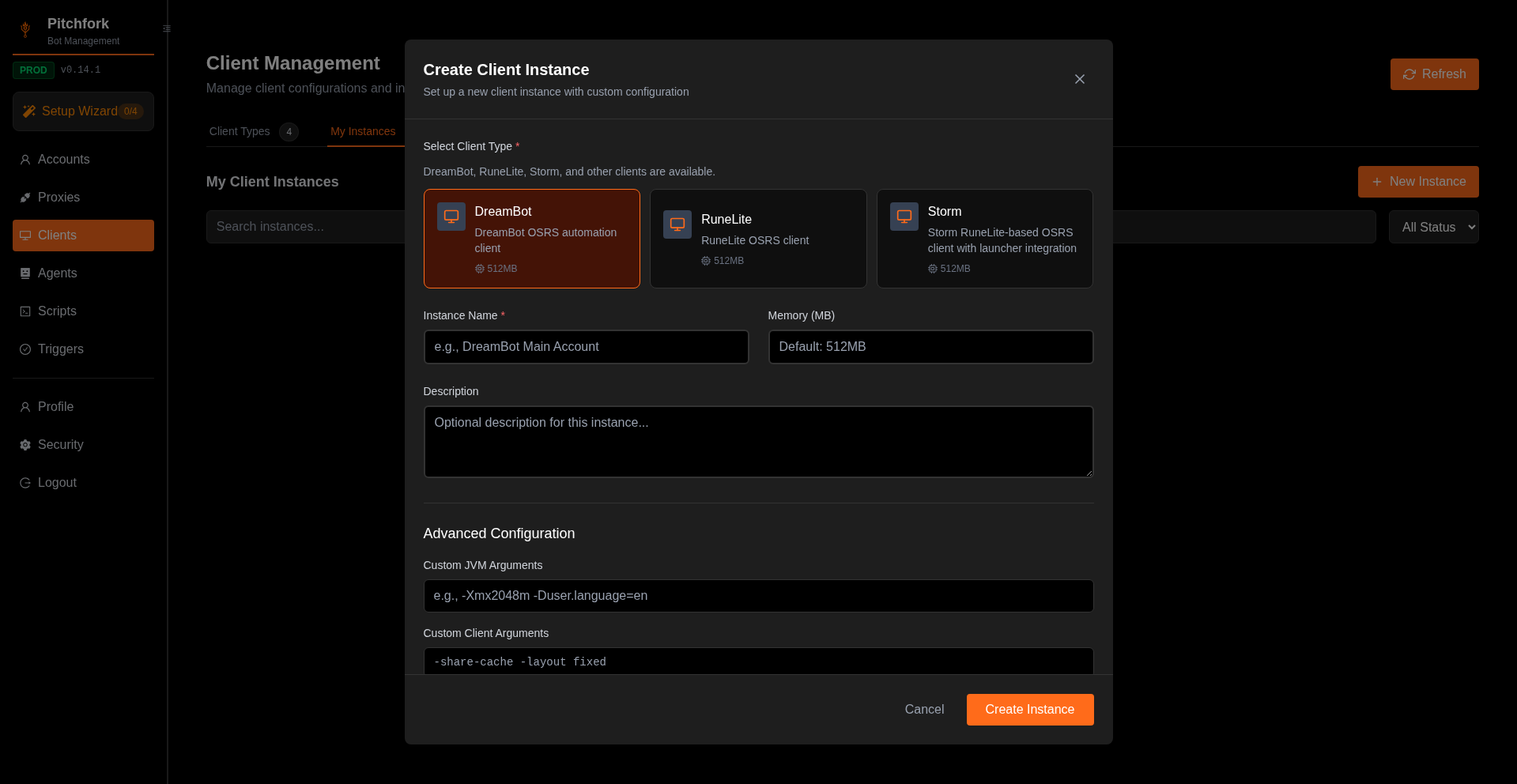
- In Pitchfork, go to Clients → Client Types tab → click Create Instance on the DreamBot tile.
- Set:
- Instance Name — anything memorable
- Memory (MB) — heap for the JVM (default 512 is fine for one client; bump to 1024–2048 for memory-hungry scripts)
- (Optional) DreamBot-specific settings under Advanced Configuration — see Configuration for JVM args vs Client args
- Save, then launch a script from Accounts with this client selected. Pitchfork's wrapper handles login, script selection, and lifecycle.
The Create Client Instance modal looks like this with DreamBot selected:
Configuration
Pitchfork understands the full DreamBot CLI surface. Defaults are sane; the most commonly tuned options are:
| Field | Type | Default | Notes |
|---|---|---|---|
fps | int (1–50) | 15 | Cap render rate to reduce CPU/GPU load |
mouseSpeed | int (1–100) | 50 | Higher = faster mouse |
breaks | string | "" | DreamBot break-pattern string (e.g. 45-60,5-10) |
covertMode | bool | false | Hides DreamBot from common detection vectors |
freshStart | bool | false | Clears cached state on launch |
shareCache | bool | true | Reuse the OSRS cache across instances |
lowDetail / disableAnimations / disableModels / disableSounds | bool | false | Reduce client resource use |
noClickWalk / menuManipulation / noInputLogin | bool | varies | Behavioural anti-ban toggles |
worldHopOnLoginError | bool | false | Auto-hop on login failure |
worldHopOnLoginErrorMax | int | 5 | Max hops before giving up |
worldHopOnLoginErrorWorlds / WorldsBlacklist | csv | "" | World allow/deny lists |
dismissRandomEvents | bool | true | Auto-dismiss random events |
deleteAccountOnBan | bool | false | Remove the account from Pitchfork on ban |
Proxy
Set the proxy fields on the Client Instance and Pitchfork passes -proxy host:port (or user:pass@host:port if credentials are provided) to DreamBot automatically.
Webhooks
DreamBot ban/death/level/script-event webhooks are wired through the standard Pitchfork notification fields (webhookUrl, notifyOnBan, notifyOnDeath, etc.) — no client-side configuration needed.
Was this page helpful?